熊猫剪球 · 网球比赛视频剪辑Panda Tennis · Tennis match video
录下整场,回合帮你找好。Film the whole match.We find the rallies.
把整场比赛视频交给熊猫剪球:在手机上自动识别回合,你再倍速过一遍、拖一拖起止点,就能得到带比分牌的比赛成片和精彩集锦。边打边记分、约球、战绩与排行榜,也都在同一个 App 里。 Hand Panda Tennis your full match recording. It picks out the rallies on-device; you skim them at speed, nudge the edges, and you have the full match with a running scoreboard — plus a highlight reel. Live scoring, sessions, records and rankings live in the same app.
- 视频库Library
- 每场比赛按日期归档Every match, filed by date
- 回放Replay
- 按回合点着看Jump rally by rally
- 成片Match film
- 片头 · 比分牌 · 4KTitle · scoreboard · 4K
- 统计Stats
- 每月场次与时长Matches & hours each month
IPHONE · IPAD真机界面Live product screens
你会得到什么What you get
打过的每一场,
都整理好、找得到Every match you’ve played,
sorted and easy to find
01 — 视频库Library
每一场比赛,
都在视频库里Every match,
in one library
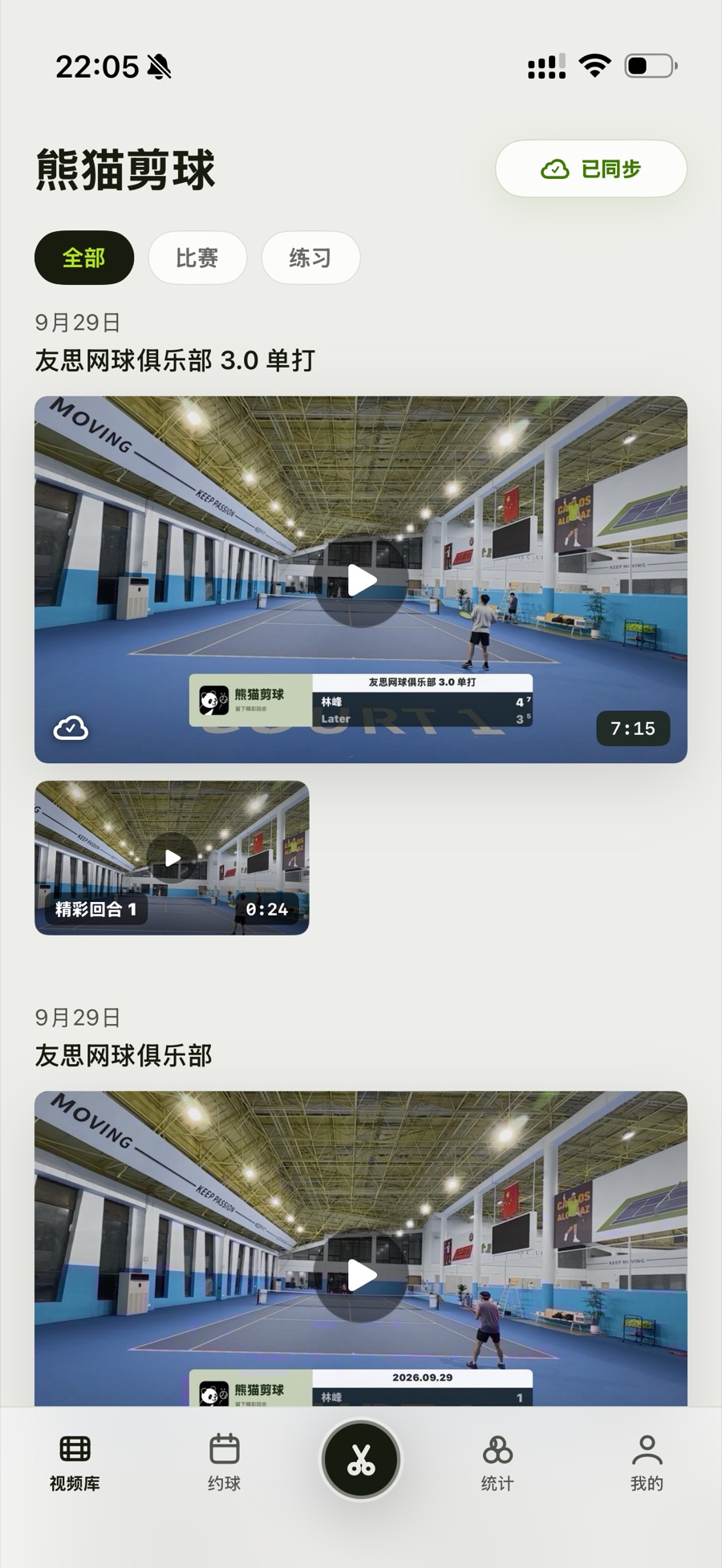
比赛按日期和球场归档,封面就是片头,一眼认出是哪一场、谁和谁、打了几比几。精彩回合单独成片,和整场比赛放在一起。Matches are filed by date and venue, with the title card as the cover — you can tell at a glance which match it was, who played and the score. Highlight reels sit right next to the full match.
- 分类Filters全部 / 比赛 / 练习,比赛还能按选手筛选All / matches / practice; filter matches by player
- 精彩集锦Highlights打星的好球单独成片,跟在整场比赛下面Starred points become their own reel, filed under the match
- 云视频库Cloud libraryPro 会员可将比赛与剪辑同步到云端Pro members can sync matches and edits to the cloud
视频库Library
02 — 按回合回放Rally-by-rally replay
想看哪一分,
就点哪一分Want that point?
Tap that point.
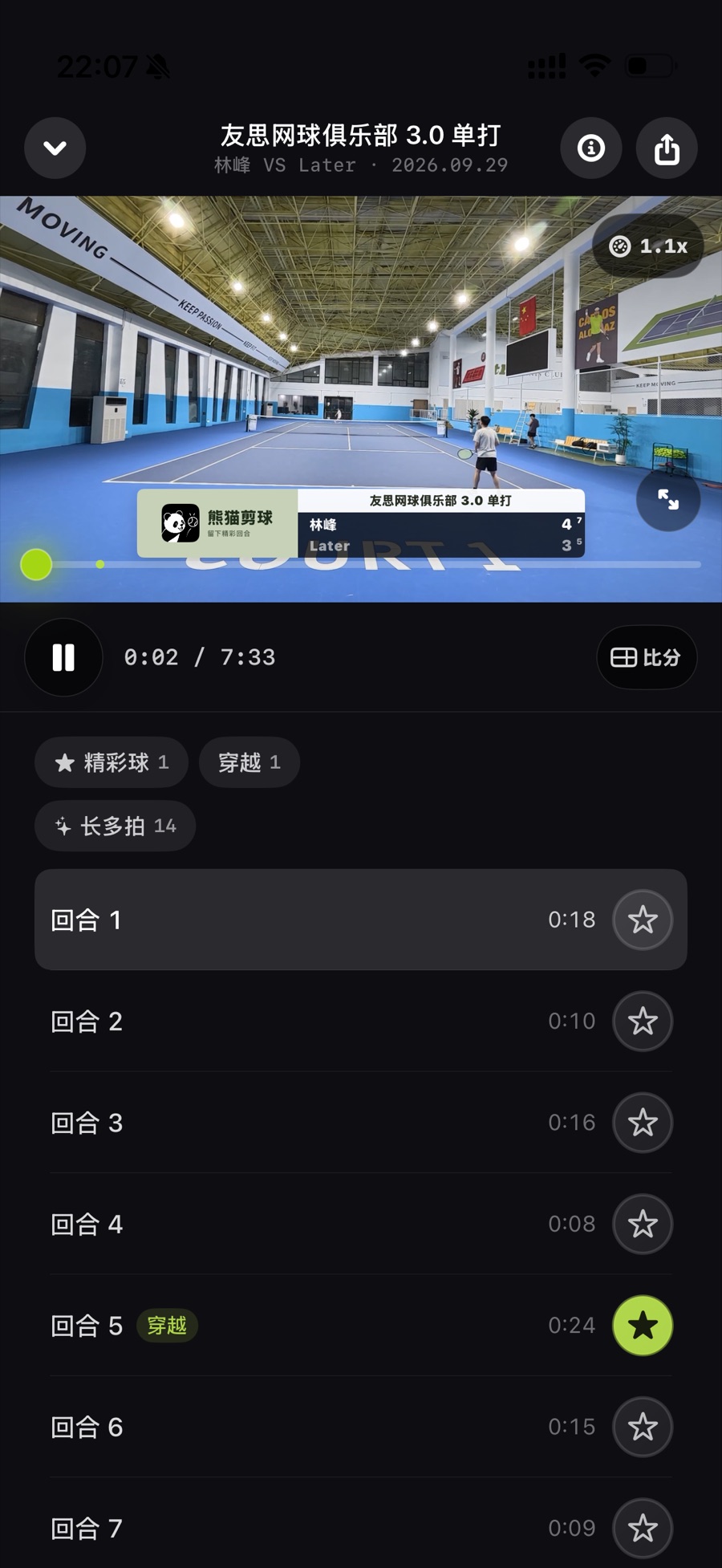
整场比赛被分成一个个回合,列表里点一下就跳过去,不用再拖进度条。好球打上标签,回放时一键筛出来。The match is split into rallies; tap one in the list and you’re there — no more scrubbing. Tag the good ones and filter to them in one tap.
- 回合列表Rally list每个回合标出时长,点击直达Every rally with its length, one tap away
- 标签筛选Tags精彩球可标 ACE、穿越、截击等;15 秒以上的回合自动标为长多拍Tag highlights as ACE, passing shot, volley and more; rallies over 15 s are marked long automatically
- 播放Playback回放可调倍速,也能横屏全屏看Adjustable speed, landscape full screen
回放 · 回合列表Replay · rally list
03 — 统计Stats
每打一天球,
球场里多一颗球Every day you play,
one more ball on court
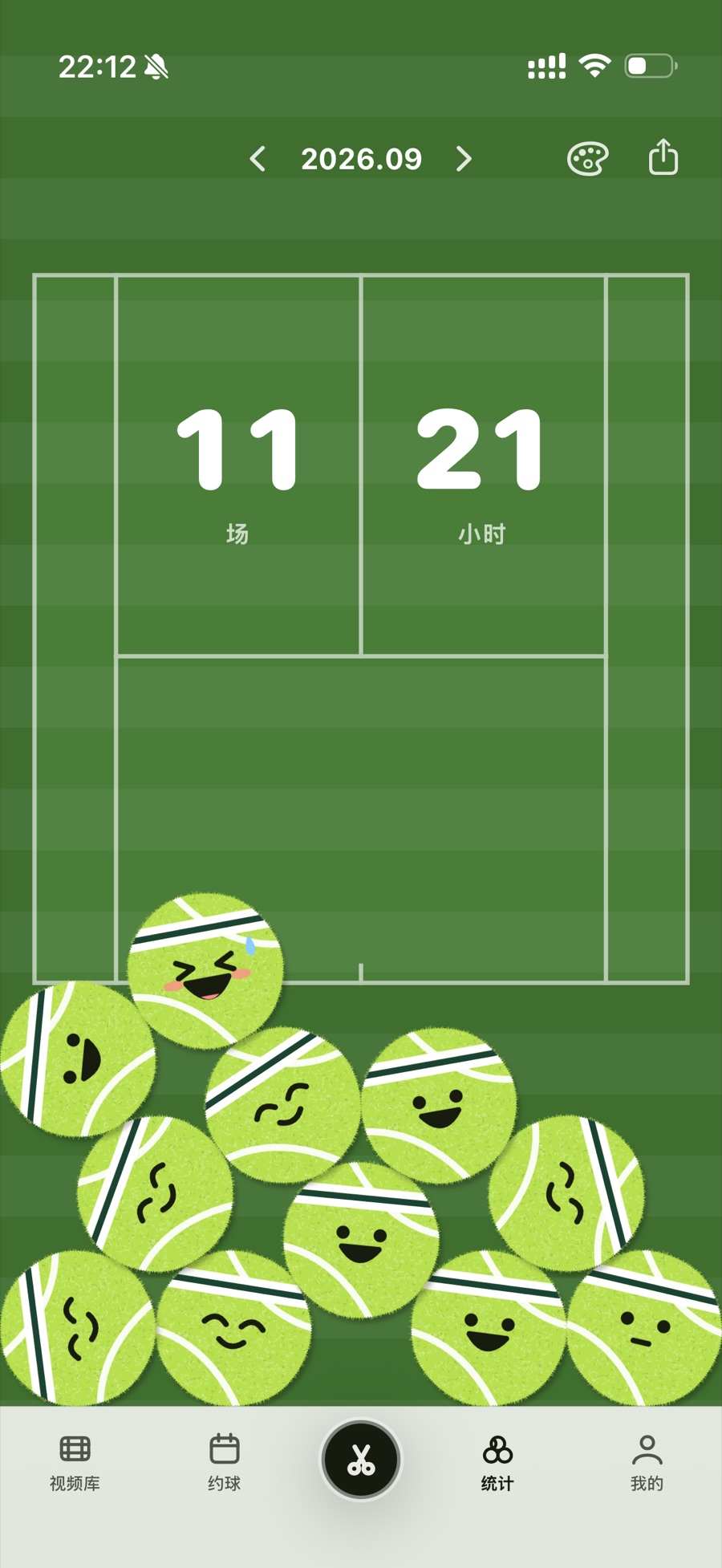
月度统计画成半片球场:这个月打了几场、几个小时,一眼就知道。每个打球日是一颗会笑的网球,倾斜手机,它们就在场地里滚来滚去。Your month, drawn as half a court: matches and hours at a glance. Each day you played is a smiling tennis ball — tilt your phone and they roll around the court.
- 录了视频、记了比分或打了卡,都算一个打球日A recording, a logged score or a check-in each count as a day played
- 草地、红土、硬地多种球场配色Grass, clay and hard-court colourways
- 一键生成本月海报,分享出去One tap makes a monthly poster to share
怎么得到How it’s made
从一段原始视频,
到一部比赛成片From raw footage
to a match film
04 — 剪辑流程Workflow
不用再拖着进度条找回合No more scrubbing for the rallies
业余球员最常见的困境:录了整场,却从来没时间回看。熊猫剪球把“找回合”交给机器,把“确认”留给你——不追求一键全自动,而是让校对足够快。The usual story: you film the whole match and never get round to watching it. Panda Tennis hands the rally-hunting to the machine and leaves the final call to you — not one-tap magic, but a review loop fast enough to actually finish.
STEP 01
导入ImportIMPORT
从相册或“文件”导入整场视频,大疆、影石等运动相机素材也能直接用。Bring in a full match from Photos or Files — footage from DJI, Insta360 and other cameras works too.
STEP 02
识别DetectDETECT
在手机上分析击球声,自动找出回合,跳过捡球、换边与等待。On-device analysis of the sound of the ball picks out the rallies and skips the ball-chasing, changeovers and waiting.
STEP 03
校对ReviewREVIEW
倍速逐个过回合:保留或删除,拖动起止点,必要时一分为二。Skim rally by rally at speed: keep or drop, drag the edges, split one in two when needed.
STEP 04
回看ReliveSHARE
带比分牌的比赛成片与精彩集锦,最高 4K 导出,或生成链接发给球友。A finished match cut with scoreboard plus highlights — export up to 4K, or send friends a link.
05 — 回合校对Rally review
横屏校对,
一个回合一个回合过Review in landscape,
one rally at a time
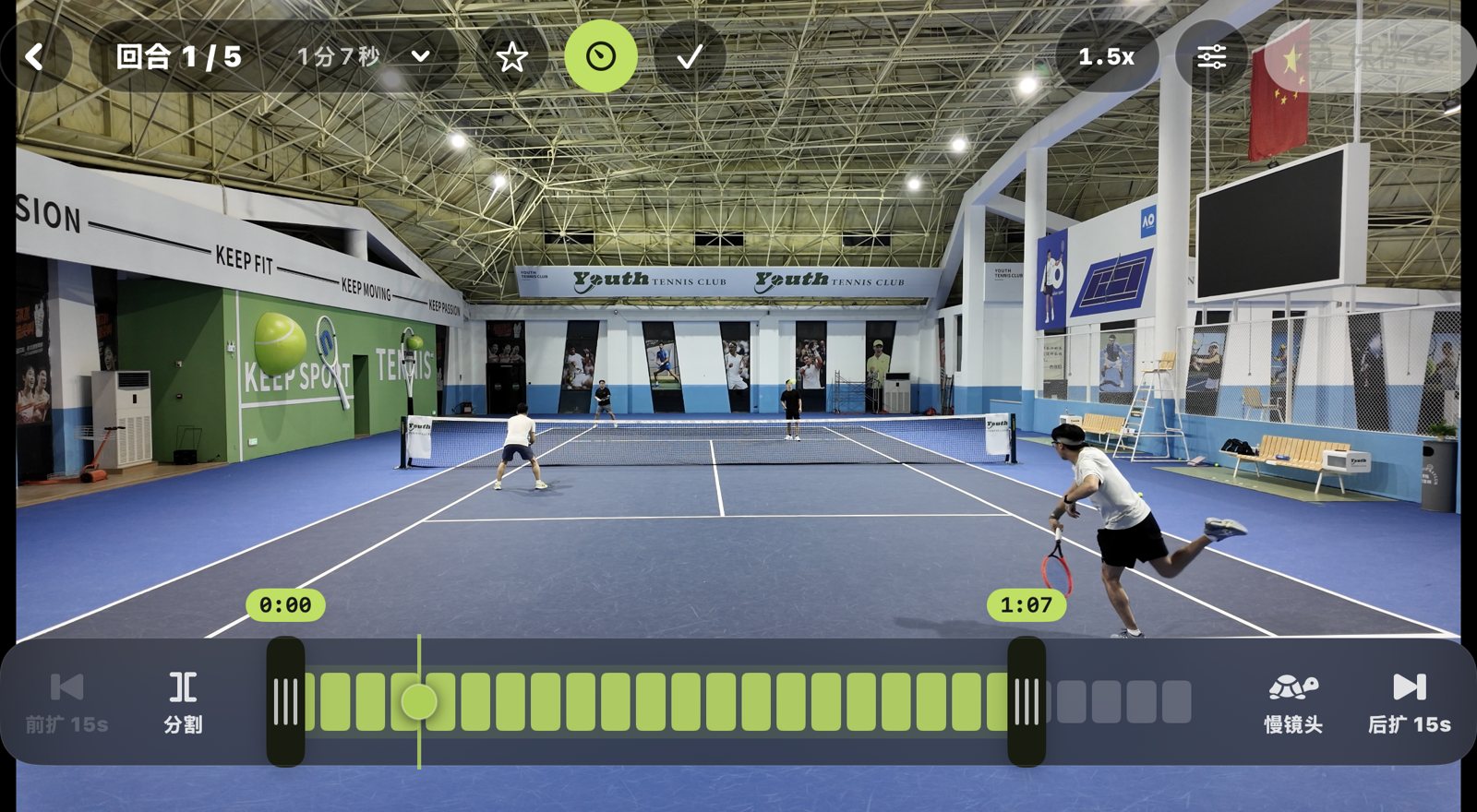
识别不必完美,修正必须够快。时间轴上每一格都是一段画面,两端的把手就是这一分的开始与结束。Detection doesn't have to be perfect — fixing it has to be fast. Each tick on the timeline is a slice of footage; the handles at either end are where the point starts and stops.
- 倍速速览Speed1× / 1.2× / 1.5× 速览;长按进入 0.5× 鹰眼慢放Skim at 1×, 1.2× or 1.5×; press and hold for 0.5× “hawk-eye” slow-mo
- 起止微调Trim拖动两端把手精确到每一拍;前扩 / 后扩 15 秒,找回漏掉的开头和结尾Drag either handle to the exact shot; extend 15 s before or after to recover a missed start or finish
- 分割Split两分被连在一起时,在中间一刀分开When two points ran together, cut them apart in one tap
- 慢镜头与标星Slow-mo & star圈出关键一拍,成片里紧接着慢放重播;好球打上星标Mark the key shot for an instant slow-motion replay in the cut; star the good ones
 12345
12345- 1回合切换Rally switcher回合 1 / 5,逐个往下过Step through rally 1 of 5
- 2倍速Speed1× / 1.2× / 1.5×1×, 1.2× or 1.5×
- 3起止把手Start / end handles拖动调整这一分的开始与结束Drag to set where the point starts and ends
- 4前扩 15s · 分割Extend −15s · split找回漏掉的开头;把连着的两分分开Recover a missed start; split two points apart
- 5慢镜头 · 后扩 15sSlow-mo · extend +15s关键一拍慢放;找回漏掉的结尾Slow-mo the key shot; recover a missed finish
回合校对 · 真机截图Rally review · live screen
06 — 成片元素What goes into the film
场边点一下记分,
视频里就有比分牌Tap the score courtside.
It shows up in the video.
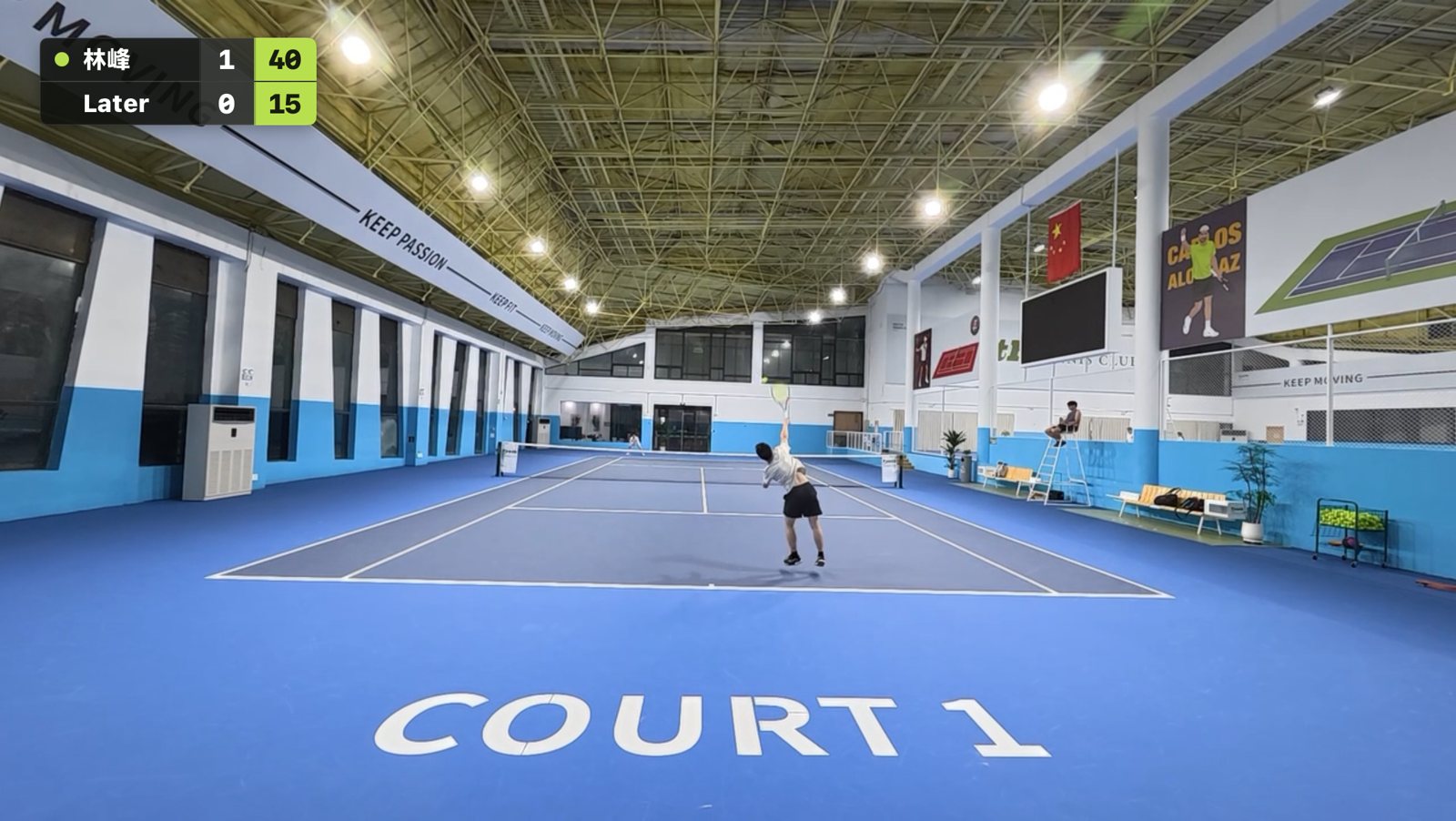
比赛时在手机上逐分记分,锁屏也能看比分。导入同一时段的视频后,熊猫剪球按记分时间戳生成实时比分牌,随回合推进。Keep score point by point on your phone during the match — it’s on the lock screen too. Import video from the same session and Panda Tennis uses the scoring timestamps to build a live scoreboard that advances rally by rally.
- 实时比分牌Live scoreboard转播风格,放在画面左上角:发球方、双方局分与本局比分一眼看清Broadcast-style, top-left of the frame: server, games and the current point score at a glance
- 赛制Formats单打 / 双打,4 局 / 6 局,一盘 / 三盘两胜,金球 / AD,抢七与决胜抢十Singles / doubles, 4- or 6-game sets, one set or best of three, golden point / AD, tiebreaks and match tiebreak
- 时间对齐Sync按记分时间与视频拍摄时间自动对齐,运动相机素材也支持Score and footage line up by timestamp, including action-camera files
 1
1- 1实时比分牌Live scoreboard绿点是发球方,中间一列是局分,荧光绿一列是本局比分(40–15)The dot marks the server, the middle column shows games, the green column the point score (40–15)
比赛成片 · 真机截图Match film · live screen
成片里还可以加上Also in the film
TITLE CARD
片头卡Title card
带熊猫剪球标识,开场交代赛事名、对阵双方与比分(或日期);比赛与练习分开归类。Branded with Panda Tennis: event, players and the score (or date) up front; filed as a match or a practice.
SLOW-MO
慢镜头重播Slow-mo replay
在校对时圈出关键一拍,成片里这一分打完会紧接着慢放重播。Mark the key shot while reviewing, and the film replays it in slow motion right after the point.
SERVE SPEED
发球速度Serve speed
基于视频画面估算发球速度;持拍手戴 Apple Watch 时更准。赛后在视频里直接看。Estimated from the video, sharper with an Apple Watch on your racket hand. See it right in the replay.
HIGHLIGHTS
精彩集锦Highlight reel
打星的好球单独合成一段集锦,和整场比赛一起放在视频库里。Starred points are cut into their own highlight reel, filed next to the full match.
EXPORT
高清导出HD export
原片到 4K 多档分辨率,导出倍速可调;“熊猫剪球”水印可开可关。From source resolution up to 4K, adjustable playback speed, and a watermark you can switch off.
SHARE
链接分享Share by link
发到微信或朋友圈,好友无需下载即可观看,还能看到播放次数。Send to WeChat or Moments; friends watch without installing anything, and you see the view count.
图中数值为示意。链接分享与云视频库为 Pro 会员功能。Figures shown are illustrative. Link sharing and the cloud library are Pro features.
07 — 比赛与约球Matches & sessions

约球、战绩与排名,
交给 Match NoteSessions, records and rankings,
powered by Match Note
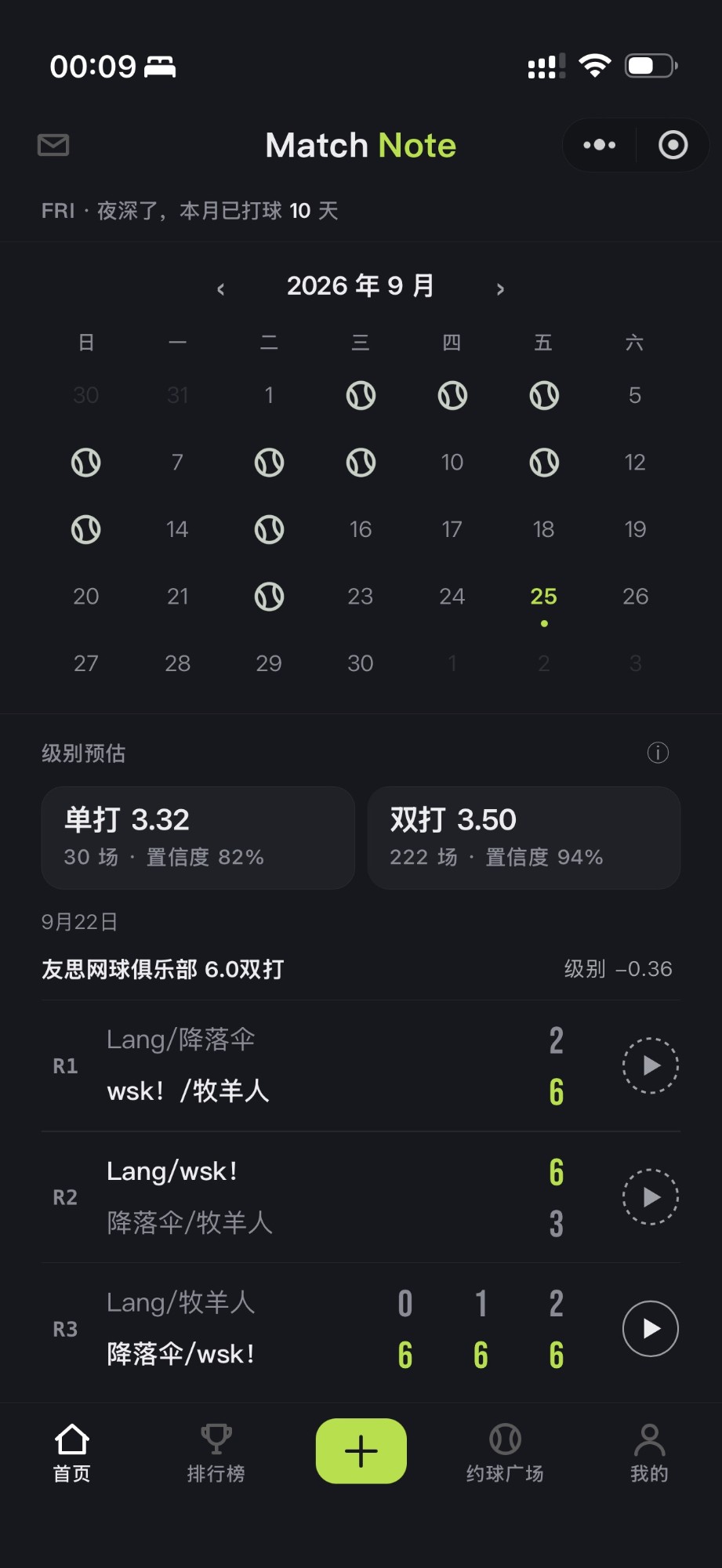
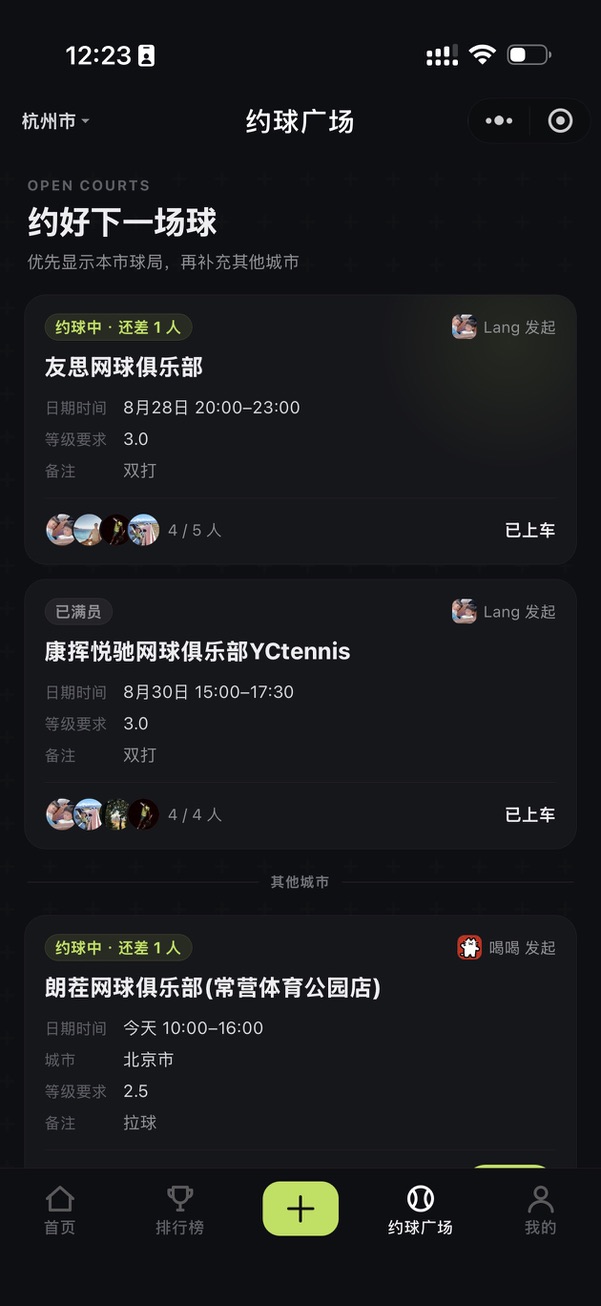
约球、赛事编排、比分录入、排行榜与级别预估,由我们的微信小程序 Match Note 提供。熊猫剪球直接接入这些数据——在 App 里也能约球、看战绩和排行,战绩里的比赛点开就是视频。Sessions, event draws, score reporting, leaderboards and level estimates come from Match Note, our WeChat Mini Program. Panda Tennis plugs straight into that data — book, check your record and the rankings in the app, and open any match in your record straight into its video.
- 约球广场,球友用小程序就能报名,不用装 AppOpen session board; friends join from WeChat, no app install
- 单打、双打级别预估,球场与球友群排行榜Singles and doubles level estimates; venue and group leaderboards
- 战绩里的比赛,点开就能回看视频Any match in your record opens into its video
08 — 我们的取舍How we build it
为真实的
业余球场设计Designed for real
amateur courts
固定机位、一部手机、两个小时、没有裁判——这是大多数业余比赛的样子。熊猫剪球的每个默认值,都从这里出发。One phone on a fence, two hours of court time, no umpire — that's most amateur tennis. Every default in Panda Tennis starts from there.
P-01 · ON DEVICE
在手机上识别Detected on your phone
回合识别在本机分析音轨完成,识别过程中视频不会离开你的手机。Rally detection analyses the audio track on the device — your footage never leaves the phone during detection.
P-02 · HUMAN IN LOOP
你说了算You make the call
识别结果只是建议。保留、删除、微调都由你决定,校对流程为速度而设计。Detection is a suggestion. Keep, drop and trim are yours; the review flow is built for speed.
P-03 · IPAD FIRST
大屏优先Big screen first
iPad 上校对最舒服,iPhone 同样完整可用,横竖屏都适配。Reviewing is best on iPad, fully usable on iPhone, in portrait or landscape.
下一场比赛,
录下来交给熊猫Film your next match.
Let the panda find the rallies.
熊猫剪球即将上架 App Store,现在可以通过 TestFlight 加入公测。识别、校对与本地高清导出免费;Pro 会员提供云视频库与在线播放分享。iPhone 与 iPad 通用,需 iOS 17 或更高版本。Panda Tennis is coming to the App Store; join the public beta on TestFlight today. Detection, review and local HD export are free; Pro adds a cloud library and online sharing. iPhone and iPad, iOS 17 or later.